How-to guide
How to Write an Invoice (With a Free Template)
An invoice is the document that turns finished work into money in your account. It is also, quietly, a tax record: the IRS lists invoices among the supporting documents businesses are expected to keep for gross receipts and sales, alongside receipt books and deposit information. So an invoice has two jobs — get you paid quickly, and stand up as a record months later when someone asks what that $2,400 deposit was for.
Most late payments are not caused by difficult clients. They are caused by invoices that are missing a due date, a reference number, or clear instructions on how to actually pay. This guide walks through the ten elements every invoice needs, gives you a copy-paste template you can use today, and shows a complete worked example. At the end you'll be able to write one from scratch in about five minutes — or generate it instantly.
Quick answer: what every invoice must include
A complete invoice has ten elements. Miss one of the first eight and you'll be chasing the client for clarification instead of payment.
| # | Element | Why it matters |
|---|---|---|
| 1 | The word "Invoice" | Distinguishes it from an estimate or receipt |
| 2 | Your business details | Name, address, email, phone, tax ID if you have one |
| 3 | Client details | Legal business name and the person who approves payment |
| 4 | Invoice number | Unique reference for both sides' records |
| 5 | Issue date | Starts the payment clock |
| 6 | Due date | The single most important field for getting paid on time |
| 7 | Itemized lines | Description, quantity, rate, and line total for each item |
| 8 | Subtotal, tax, total due | The math, shown so it can be checked |
| 9 | Payment instructions | Exactly how to pay — bank details, link, or accepted cards |
| 10 | Terms and notes | Late fee policy, deposit already paid, thank-you line |
The anatomy of an invoice
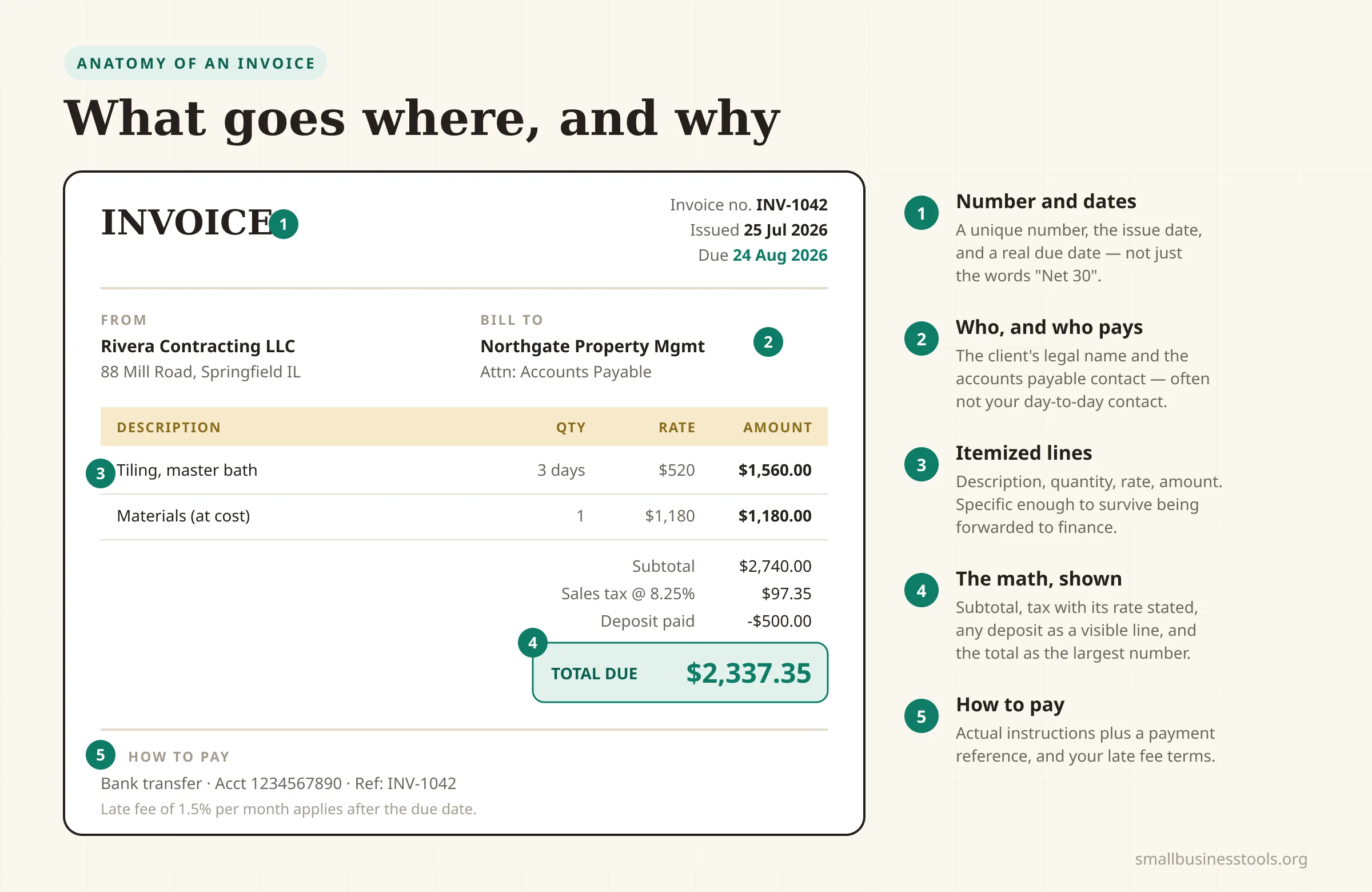
Every invoice follows the same top-to-bottom logic: who is billing whom, for what, how much, and how to pay. Here is how those blocks sit on the page.
What you need before you start
Gather these first and writing the invoice takes minutes rather than an afternoon:
- The agreed price, and any estimate or quote number it came from.
- The client's correct legal name and billing contact. Invoices sent to the person you worked with, rather than the person who pays, are the most common cause of a silent 30-day delay in larger companies.
- A record of what you delivered — hours, units, milestones, or a deliverable list.
- Your payment terms — how many days the client has, and what happens after.
- Your sales tax position — whether this sale is taxable, and at what combined rate.
Step 1: Number the invoice
Every invoice needs a unique number, and the numbers should never repeat or go backwards. Sequential numbering is what lets you — and an accountant, and eventually a tax authority — confirm nothing is missing.
Three schemes that work:
- Plain sequential:
1001,1002,1003. Simplest. Start at 1001 rather than 1 so your first client can't tell they're your first client. - Date-based:
2026-07-014(year, month, sequence). Makes filing and searching effortless. - Client-prefixed:
ACME-014. Useful when you have a handful of retainer clients and want per-client continuity.
Pick one and never change it mid-year. If you use an estimate first, carry the estimate number into the invoice as a reference line — it links the two documents in both sets of records.
Step 2: Set the issue date and the due date
The issue date is the day you send it. The due date is the day payment is expected — and it must be an actual date, not a phrase.
"Net 30" is a term, not a due date. Half of the small businesses that write "Net 30" and nothing else get paid late simply because nobody in accounts payable did the arithmetic. Write both: Terms: Net 30 and Due: 24 August 2026. Our payment terms guide covers how to choose between Net 15, Net 30, due-on-receipt, and deposit structures.
Step 3: Itemize the work
Each line gets a description, a quantity, a rate, and a line total. The description is the part people rush and shouldn't — it's what the client's finance team reads when deciding whether to approve or query the invoice.
Weak: Consulting — $2,400
Strong: Brand strategy workshop and positioning document — 12 hours @ $200/hr — $2,400
The strong version survives being forwarded to someone who wasn't in the room. If you bill hourly, the Hourly Rate Calculator helps you set the rate in the first place, and our guide on setting your hourly rate covers the arithmetic behind it.
Step 4: Do the math — subtotal, tax, total
Show the stack, don't just show a number:
- Subtotal — all line totals added up.
- Discount, if any — as a line, with the reason ("10% repeat client discount"). Our discount guide covers what that discount actually costs you in margin.
- Sales tax — the taxable subtotal times your combined rate, shown as its own line with the rate stated ("Sales tax @ 8.25%").
- Total due — the number the client pays. Make it the largest text on the page.
Sales tax is where invoices most often go wrong, because the rate depends on where the sale happens and not every line is necessarily taxable. The Sales Tax Calculator handles both directions — adding tax to a price and pulling it back out of a tax-inclusive total.
Step 5: Say exactly how to pay
This is the field most often left vague, and it directly costs you days. "Payment via bank transfer" is not instructions. Instructions look like:
Include the invoice number as the payment reference. Untraceable incoming payments are a real cost — you either spend an hour matching them or chase a client who has already paid.
The copy-paste invoice template
Fill in the bracketed fields. This is deliberately plain text so you can paste it into an email, a document, or a notes app and adapt it.
INVOICE

Invoice number:  [INV-1042]
Issue date:      [25 July 2026]
Due date:        [24 August 2026]
Terms:           [Net 30]
Reference:       [Estimate EST-0117]

FROM
[Your Business Name]
[Street, City, State ZIP]
[email]  |  [phone]
[Tax ID / EIN, if applicable]

BILL TO
[Client Legal Name]
[Attn: Accounts Payable contact]
[Street, City, State ZIP]
[email]

-------------------------------------------------------------
DESCRIPTION                      QTY     RATE       AMOUNT
-------------------------------------------------------------
[Item or service description]    [1]     [$0.00]    [$0.00]
[Item or service description]    [1]     [$0.00]    [$0.00]
-------------------------------------------------------------
                              Subtotal              [$0.00]
                              Discount              [-$0.00]
                              Sales tax @ [0.00%]   [$0.00]
                              TOTAL DUE             [$0.00]
-------------------------------------------------------------

HOW TO PAY
Bank transfer: [Bank], Acct [number], Routing [number]
Reference: [INV-1042]
Checks payable to: [Your Business Name]

TERMS
Payment due within [30] days of the issue date.
A late fee of [1.5%] per month applies to overdue balances.

Thank you for your business.
Worked example: a contractor's invoice
Rivera Contracting finishes a bathroom tiling job for a property manager. The agreed scope was 3 days of labor at $520/day plus materials at cost. Materials came to $1,180. The client paid a $500 deposit when the estimate was approved. The combined local sales tax rate on materials is 8.25%; labor is not taxable in this jurisdiction.
| Line | Detail | Amount |
|---|---|---|
| Labor | Tiling, master bath — 3 days @ $520/day | $1,560.00 |
| Materials | Porcelain tile, thinset, grout, trim (at cost) | $1,180.00 |
| Subtotal | $2,740.00 | |
| Sales tax | 8.25% on materials only ($1,180 × 0.0825) | $97.35 |
| Deposit | Paid 8 July 2026, estimate EST-0117 | −$500.00 |
| Total due | $2,337.35 |
Three things make this invoice work: the deposit appears as a visible line rather than being silently netted off, the tax line states what it was applied to, and the estimate number ties it back to what the client already approved. A client can check every number without emailing you.
Generate it instead
Once you've written a few by hand, the manual version stops being worth the time. The Invoice Generator builds a complete, professional PDF in the browser — line items, tax, discounts, logo upload, and a live preview — with no signup and nothing sent to a server. If you need to quote before you bill, the Estimate Generator produces the matching document, and our roundup of the best free invoice generators compares the wider options honestly, including the ones that beat ours for recurring billing.
Common mistakes
- No due date. Terms without a calendar date puts the arithmetic on the person least motivated to do it.
- Sending to the wrong person. Your day-to-day contact is often not the payer. Ask who to bill *before* you invoice.
- Vague line descriptions. "Services rendered" invites a query, and a query resets the clock.
- Reusing or skipping invoice numbers. Breaks your records and looks careless.
- Burying the total. The number should be unmissable at a glance.
- No payment reference. Creates untraceable deposits you'll spend time reconciling.
- Waiting to send. Invoice the day the work is accepted. Every day you delay is a day added to the front of your payment cycle.
- Netting off a deposit silently. Show it as a line; otherwise the client sees a total that doesn't match the estimate and pauses to ask why.
Pre-send checklist
- Unique, sequential invoice number
- Issue date and an actual due date, not just terms
- Correct client legal name and billing contact
- Every line has description, quantity, rate, and amount
- Subtotal, any discount, tax with the rate stated, and total due
- Tax applied only to taxable lines
- Any deposit or prior payment shown as a visible line
- Payment instructions with a reference
- Late fee terms stated
- Reference to the estimate or PO number if one exists
- Saved a copy for your records
FAQs
Do I legally need to issue an invoice?+
For most US small businesses there is no standalone federal law requiring an invoice for every sale, but you are required to keep records that support the income you report. The IRS names invoices among the supporting documents for gross receipts, so in practice an invoice is how you satisfy that. If you're registered for sales tax, your state may also have specific requirements about what a sales document must show — check your state's revenue department.
What's the difference between an invoice and a receipt?+
An invoice requests payment; a receipt confirms payment was made. The invoice comes first and is a claim on money owed. The receipt comes after and is proof the obligation was settled. Many small businesses send both — the invoice on completion, the receipt once the transfer lands.
Should I put a late fee on my invoices?+
Yes, if you've stated it in advance in your contract or terms. A late fee you announce for the first time on an overdue invoice is difficult to enforce and damages the relationship. Common practice is 1–1.5% per month, but states cap the interest you can charge, so check your state's limit before setting a rate.
What invoice number should I start with?+
Anything except 1. Starting at 1001, or using a date-based scheme like 2026-07-001, avoids signalling that the client is your very first. The only hard rules are that numbers must be unique and should not go backwards.
How soon should I send an invoice?+
The same day the work is accepted, or the same day a billing period closes. Payment terms only start counting from the issue date, so a week's delay in sending is a week added to when you get paid — it doesn't buy the client any extra time, it just costs you.
Can I invoice without a registered business?+
Yes. Sole proprietors and freelancers invoice under their own name and Social Security number or an EIN. You still need all the same elements. If you're weighing whether to formalize, our [LLC formation guide](/guides/best-llc-formation-services) covers what registering actually changes and what it costs.
Do I charge sales tax on services?+
It depends entirely on your state and the service. Most states tax goods by default and services selectively — some tax almost no services, others tax many. Never assume; check your state revenue department's list, because charging tax you shouldn't and failing to charge tax you should are both expensive to unwind.
What to do next
Write your terms down once — invoice numbering scheme, payment window, late fee — and reuse them on every invoice. Consistency is what makes a one-person business read as a real business to someone else's accounts payable department.
Then stop writing them by hand. Generate your next one with the Invoice Generator, and if the job needs approval before you start, send an estimate first — our invoice vs estimate guide explains exactly when each one belongs.
Free tools to try
Keep reading
Guide
Invoice vs Estimate: When to Use Each
Invoice vs estimate explained: what each document does, when to send which, how quotes and bids differ, and the mistakes that cost small businesses money.
Guide
Payment Terms for Small Business (Net 15, Net 30, Late Fees)
What Net 30 really means, how to choose payment terms, what early-payment discounts actually cost you, and how to set a late fee that holds up.
Guide
Best Free Invoice Generators for Small Businesses (2026)
12 invoice generators ranked for small businesses — pricing, pros, cons, and key features for Wave, Zoho, PayPal, Square, Stripe and more, plus a no-signup option.