How-to guide
How to Calculate Sales Tax (With Examples)
Sales tax is a percentage added to the price of a sale, collected by the seller and passed on to the government. The math is a single multiplication — price times the tax rate — but two things trip up small business owners: pulling the tax back *out* of a tax-included total, and combining the state, county, and city rates that make up the number you actually charge. Get either wrong and your books won't reconcile at filing time. Rates vary widely by location, too — the Tax Foundation publishes the combined state and average local sales tax rate for every US state.
This guide covers all three: adding sales tax to a price, extracting it from a tax-inclusive total, and building a combined local rate. Each comes with the formula and a worked example using round numbers you can follow in your head. One honest caveat up front: sales tax rates depend entirely on where you are, so no calculator can know your rate for you — we'll show you how to find and apply it correctly.
The sales tax formula
Two formulas cover almost everything:
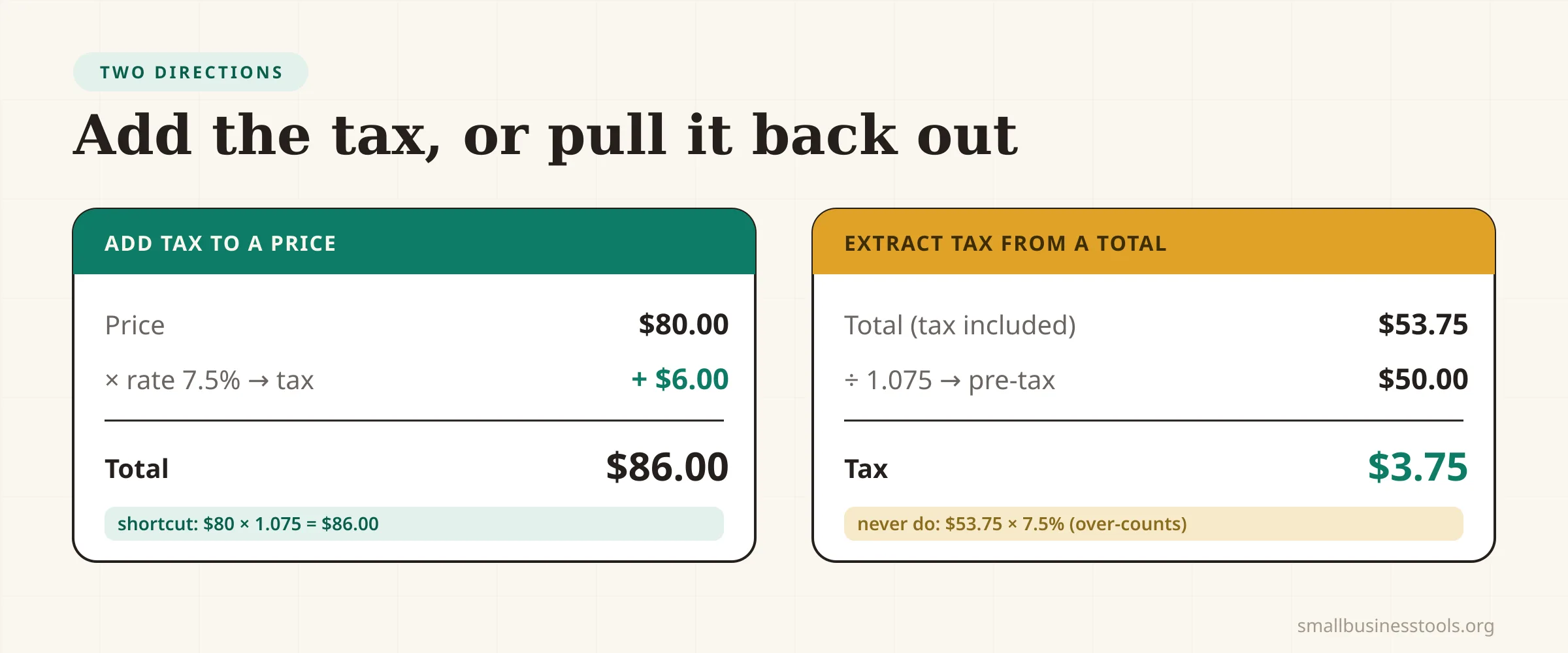
Use the tax rate as a decimal: 7.5% is 0.075. So on an $80 item at 7.5%, the tax is 80 × 0.075 = $6.00, and the total the customer pays is 80 × 1.075 = $86.00. That's the entire "adding tax" operation. The Sales Tax Calculator does it instantly, and the Percentage Calculator helps with the underlying percentage math if you want to see each step.
How to add sales tax to a price
When you know the pre-tax price and need the total to charge:
- Convert the rate to a decimal. Divide the percentage by 100 — 7.5% becomes 0.075.
- Multiply the price by the rate to get the tax amount.
$80 × 0.075 = $6.00. - Add the tax to the price for the total.
$80 + $6.00 = $86.00.
A shortcut for the total in one step: multiply by 1 + rate. $80 × 1.075 = $86.00. Same answer, one calculation. This is what you do every time you put a taxable item on an invoice or a receipt.
How to extract sales tax from a total
This is the one people get wrong. If a price already *includes* tax — say a $53.75 all-in total at a 7.5% rate — you cannot just take 7.5% of $53.75. That would over-count, because the tax was calculated on the smaller pre-tax price, not the total.
The correct way is to divide the total by 1 + rate:
So $53.75 ÷ 1.075 = $50.00 pre-tax, and the tax is $53.75 − $50.00 = $3.75. Check it: $50 × 0.075 = $3.75. ✓
Compare that to the wrong method: $53.75 × 0.075 = $4.03, which is 28 cents too high. On one sale it's trivial; across a year of tax-inclusive pricing it's a real reconciliation error. You'll need this whenever your displayed prices include tax and you have to report the tax portion separately.
How to combine state and local rates
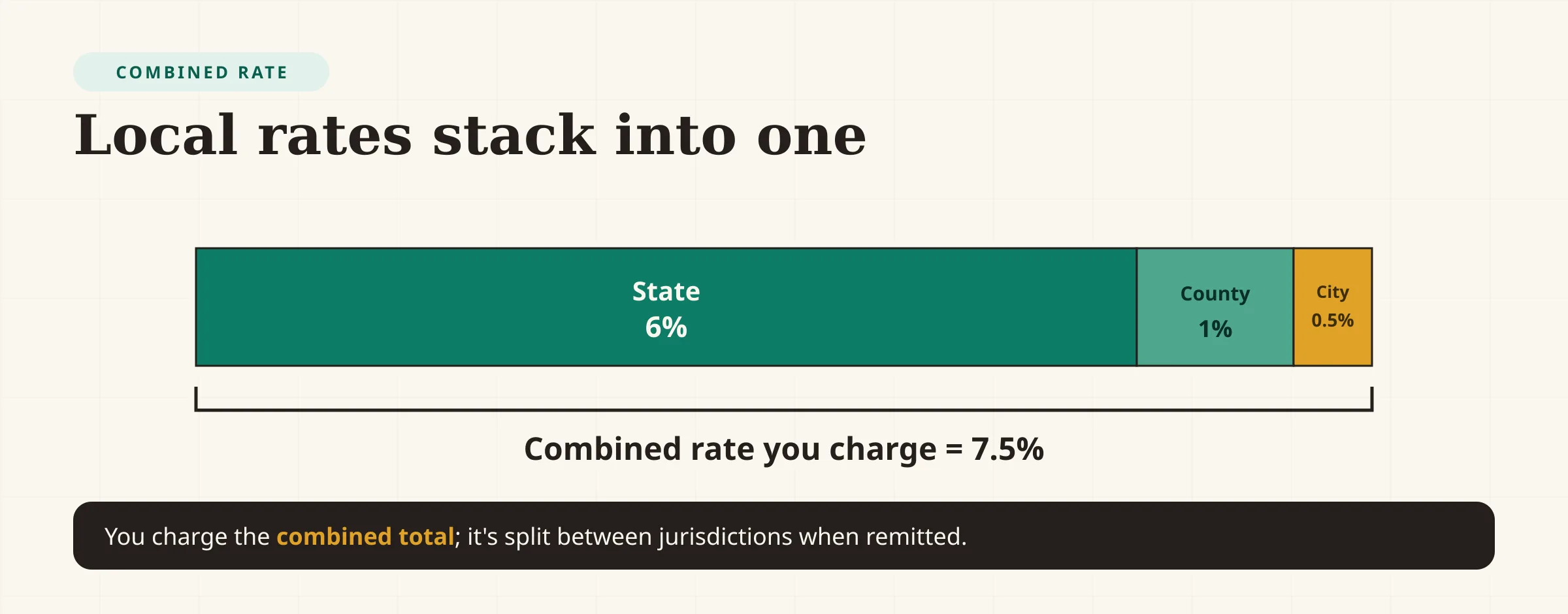
In the US, the rate you charge is usually not a single state rate — it's a combined rate stacked from several jurisdictions:
Combined rate = State + County + City + any special district
For example, a 6% state rate, a 1% county rate, and a 0.5% city rate add up to a 7.5% combined rate. You charge the combined rate, then the money is distributed to each jurisdiction behind the scenes. You just need the total.
Rates also depend on which location matters. Many states use destination-based sourcing (the buyer's location sets the rate) while others use origin-based (the seller's). For online sales this matters a lot, and it's governed by economic nexus rules that vary by state. When in doubt, your state's Department of Revenue is the authority.
Worked example: a coffee shop receipt
A café rings up an order of $18.00 in taxable items. The combined local rate is 8%.
- Tax =
$18.00 × 0.08 = $1.44 - Total =
$18.00 + $1.44 = $19.44(or$18.00 × 1.08in one step)
At the end of the day the register shows $2,100 in tax-included sales and the owner needs the pre-tax figure for the books:
- Pre-tax sales =
$2,100 ÷ 1.08 = $1,944.44 - Sales tax collected =
$2,100 − $1,944.44 = $155.56
That $155.56 isn't revenue — it's tax the business is holding to remit. Treating collected sales tax as income is one of the most common and most painful small-business bookkeeping mistakes, because it inflates your numbers and leaves you short when the tax is due.
Sales tax is not yours to keep
The most important mental model: sales tax you collect is not income. You are a collection agent. The money belongs to the tax authority the moment you take it, and you remit it on a schedule (monthly, quarterly, or annually depending on your volume and state). Set it aside — ideally in a separate account — so it's there at filing time. If your invoices show tax as a line item, the Invoice Generator keeps it separate from your subtotal automatically.
Common mistakes
- Taking the rate off the tax-included total. As shown above,
total × rateover-counts. Divide by1 + rateto extract tax correctly. - Using the wrong combined rate. State + county + city + district can differ street by street. Verify the exact rate for the transaction's location, don't assume the state rate.
- Treating collected tax as revenue. It's not yours. Set it aside so you're not scrambling when it's due.
- Assuming everything is taxable. Many states exempt groceries, prescriptions, or certain services, and rules differ everywhere. Don't tax what shouldn't be taxed.
- Forgetting nexus for online sales. Selling into other states can create an obligation to collect their tax once you pass their thresholds. Check where you have nexus.
- Rounding at the wrong step. Round the final tax amount, not the rate, and follow your state's rounding rule to keep filings clean.
Checklist
- Confirm the item is taxable in this jurisdiction
- Find the correct combined rate for the location that applies
- Convert the rate to a decimal (÷ 100)
- To add tax: price × rate, then add to price
- To extract tax: total ÷ (1 + rate), then subtract
- Record collected tax separately from revenue
- Set the tax aside to remit on your filing schedule
FAQs
How do I calculate sales tax on a price?+
Convert the tax rate to a decimal, multiply the price by it to get the tax, then add that to the price. For an $80 item at 7.5%: `80 × 0.075 = $6.00` tax, `$80 + $6 = $86.00` total. To get the total in one step, multiply by 1 plus the rate (`80 × 1.075`).
How do I find the sales tax amount from a total that already includes tax?+
Divide the tax-included total by one plus the rate to get the pre-tax price, then subtract that from the total. For a $53.75 total at 7.5%: `53.75 ÷ 1.075 = $50.00` pre-tax, so the tax is `$3.75`. Do not multiply the total by the rate — that over-counts.
What is a combined sales tax rate?+
It's the sum of every applicable jurisdiction's rate — state, county, city, and any special district. If the state is 6%, the county 1%, and the city 0.5%, the combined rate you charge is 7.5%. The total is split between jurisdictions when it's remitted.
Does the sales tax rate depend on where the customer is?+
Often, yes. Many states use destination-based sourcing, where the buyer's location sets the rate; others use origin-based sourcing tied to the seller. For interstate online sales, economic nexus rules decide whether you must collect at all. Check your state's Department of Revenue for the rule that applies to you.
Is the sales tax I collect part of my revenue?+
No. Collected sales tax is money you hold on behalf of the tax authority and remit later — it's a liability, not income. Counting it as revenue inflates your figures and can leave you short when the tax is due. Keep it separate.
Why can't a calculator just know my sales tax rate?+
Because rates vary by state, county, city, and special district, change over time, and depend on sourcing and product-taxability rules. A calculator can apply any rate you give it accurately, but the authoritative rate for a specific address comes from your state's tax authority.
Final take
Calculating sales tax comes down to three operations: multiply price by the rate to add it, divide the total by 1 + rate to extract it, and stack state and local rates into the combined rate you actually charge. Enter your own numbers and the correct local rate into the Sales Tax Calculator, keep collected tax separate from your revenue, and remember that the one figure no tool can supply — your exact local rate — comes from your state's Department of Revenue. Get the rate right and the math takes care of itself.
Free tools to try
Keep reading
Guide
How to Write an Invoice (With a Free Template)
How to write an invoice that gets paid: the 10 elements every invoice needs, a copy-paste template, numbering and payment terms, and a worked example.
Guide
How to Price a Product for Retail (Step by Step)
How to price a product for retail: total your true costs, pick a pricing method, and set a price that hits a real profit margin. With a worked example.
Guide
How to Calculate Profit Margin (Formula + Examples)
How to calculate profit margin step by step — the formula, the difference between gross, operating, and net margin, and worked examples with real numbers.